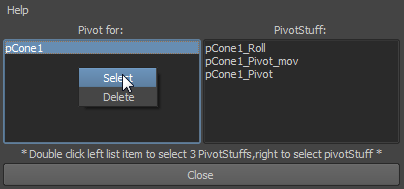
The Left list: Shows the pivot stuff by what they are controlling. The Left list: Shows the pivot stuff by what they are controlling.
The right list: Show the three pivot stuff controllers of the pivot stuff.
 Tips: Right mouse button clicking on the list left: Tips: Right mouse button clicking on the list left:
select : Select all three pivot stuff controllers who control the object. U can double click it to do the save thing.
Delete: Delete all three pivot stuffs who are controlling this object.
Right mouse button clicking on the right list:
select: Select the pivot stuff controller. U can double click it to do the same thing.
|


 of MGTools and drag downwards and release.
 or
or  and select "PivotStuff lister"